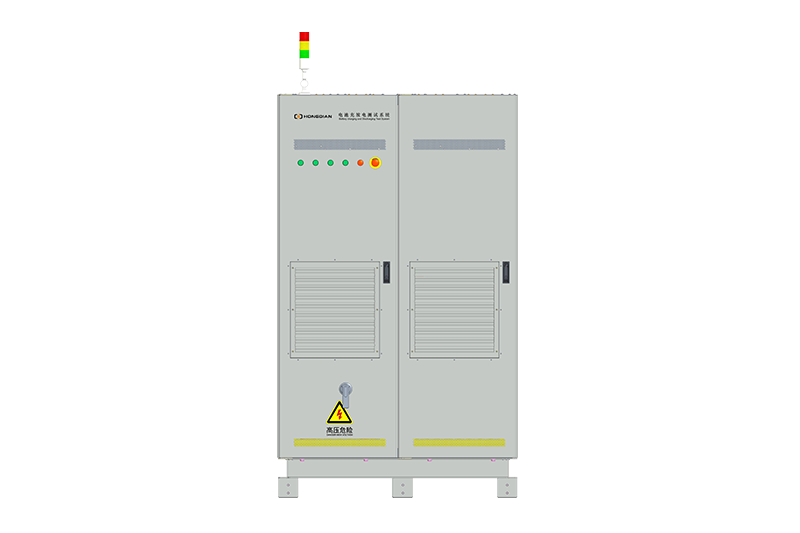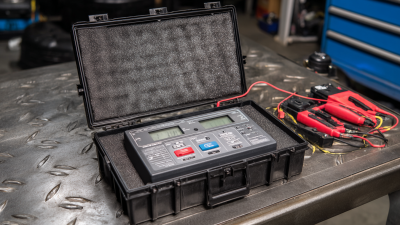
32/48 channel battery charging and discharging test integrated battery cabinet
40 channel battery charging and discharging test integrated battery cabinet
64 channel battery charging and discharging test integrated battery cabinet
80 channel battery charging and discharging test integrated battery cabinet

In today’s world, moving so quickly, it really pays off to keep your devices running smoothly. That’s where a Battery Voltage Tester comes in—you know, it’s pretty much an essential tool if you want to get things right. Here at Shenzhen Hongda New Energy Co., Ltd., we totally get how important dependable energy solutions are. That’s why we’ve dedicated ourselves to offering top-notch testing equipment to our clients. Since we started out, we’ve helped over a thousand customers across different countries and regions, expanding our sales networks all around the world.
This guide is here to walk you through some practical tips on how to use a Battery Voltage Tester. Once you get the hang of it, checking and maintaining your batteries will become way easier—and it can really help your devices last longer and work better, no matter what situation you’re in.
Getting a good handle on battery voltage testing is actually pretty important if you want your devices to last longer. Checking the voltage regularly can save you from those annoying surprises—like sudden failures—and keeps everything running smoothly. When your battery’s in good shape, your device performs better, and you also cut down on the risks like system crashes or even safety issues. Spotting potential problems early means you can fix or replace things before they turn into bigger headaches.
Plus, testing the battery helps you get a clear picture of how healthy it really is. Batteries don’t last forever—they wear out over time because of things like temperature swings or overcharging. Using a battery voltage tester gives you an idea if your battery is still up to the task or if it’s time for a change. Being proactive about this can really save you both time and money—avoiding sudden failures and extending the life of your equipment. In the end, regular voltage checks should become just part of your routine, especially if you rely on battery-powered gear. It’s kinda like giving your equipment a little check-up every now and then—worth it in the long run!
When you're picking out a battery voltage tester, it's really important to think about what you actually need and the types of batteries you'll be dealing with. Not all testers are created equal—they're often designed for specific chemistries like alkaline, nickel-cadmium, or lithium-ion batteries. So, before you buy, double-check that the tester can handle the voltage range of your batteries to get accurate readings. Also, look for models with clear, easy-to-read displays and scales; it just makes checking things a lot simpler and less guesswork.
Oh, and don't forget about portability—if you’re often testing batteries on the go, a small, lightweight tester can be a real lifesaver. On the flip side, if you want something more advanced, some testers come with nifty features like temperature compensation or digital screens, which can be super handy. Safety ratings matter too, especially if you're using it professionally. Bottom line—by understanding what you need and picking the right tool for the job, you'll get more accurate results and help keep your batteries in top shape."
Whenever you're working to keep your electronic devices running smoothly, using a battery voltage tester properly is a real game changer. Honestly, following a simple step-by-step guide to check your batteries can do wonders—helping you catch issues early and making your batteries last way longer. If you've got gadgets that need constant power, it’s pretty much a must-do. Industry reports show that regular testing can actually prevent those annoying surprise failures and boost your device’s overall reliability. With just a basic voltmeter, you can quickly see if your batteries are still good or if it’s time to swap them out.
To get started, make sure you’ve got a decent voltage tester on hand. First off, disconnect the battery from whatever’s drawing power—no load, basically. Then, grab the terminals and connect the red lead of your tester to the positive terminal, and the black lead to the negative one. It’s super important to read that voltage accurately—generally, a fully charged battery will sit around 12.6 volts. If you check and get below 12.4 volts, it’s a sign you should probably charge or replace it. Keep in mind, batteries do lose capacity over time. Also, newer gadgets like pocket inverters are a smart way to protect against power dips, making sure your vital devices stay powered up without a hitch.
| Test Step | Description | Recommended Voltage Range (V) | Potential Issues |
|---|---|---|---|
| 1. Prepare the Tester | Ensure the battery tester is functional and calibrated. | N/A | Faulty tester readings. |
| 2. Connect Tester | Attach the positive lead to the battery's positive terminal and negative lead to the negative terminal. | N/A | Reverse connections can damage the tester. |
| 3. Read Voltage | Turn on the tester and read the displayed voltage value. | 12.4 - 12.7 (Good), 12.2 - 12.4 (Needs Charge), | Misinterpretation of readings due to poor connection. |
| 4. Perform Load Test | Engage the load function (if applicable) and observe the voltage drop. | N/A | Inaccurate load testing may lead to incorrect assessments. |
| 5. Disconnect and Evaluate | Carefully disconnect the tester and evaluate the condition based on results. | N/A | Failure to interpret voltage levels accurately. |
Figuring out what your battery voltage readings mean is pretty important if you wanna keep tabs on how well your battery’s doing. When you're using a battery tester, a fully charged lead-acid battery usually shows around 12.6 to 12.8 volts. If you see numbers lower than that, it’s a sign that the battery’s either partially or fully drained—meaning it might struggle to start your car or power your gadgets properly. And hey, if you’re working with a system that runs on higher voltage, like a 24V setup, it’s super important to double-check that your readings match the expected values to keep things running smoothly and reliably.
Another thing to keep in mind is that voltage isn’t static —it can fluctuate. If your battery suddenly plummets under load, that’s a red flag and suggests it might not be holding onto its charge very well, which could lead to problems down the line. On the flip side, if you notice consistently high readings, it might mean your battery’s getting overcharged, which isn’t great either and could shorten its lifespan. That's why it’s a good idea to keep an eye on these numbers regularly. Doing so helps you catch potential issues early and keeps everything running nicely for longer. Understanding what these voltage readings really tell you can make a big difference—whether it’s about taking better care of your battery or knowing when it's time to swap it out. All in all, a little monitoring goes a long way in keeping your system happy and dependable.
This chart displays the relationship between battery voltage levels and performance metrics. Batteries typically operate within a specified voltage range, and performance can drastically change outside these levels. The data represented compares voltage readings (in volts) against performance ratings (in percentage).
When you're using a battery voltage tester, it's pretty common to make some mistakes that can throw off your readings. One of the biggest slip-ups? Not bothering to calibrate the tester before you start. If it’s not properly calibrated, you might get false readings—either thinking a battery is fine when it’s actually dead, or vice versa. That can lead to unnecessary replacements or, worse, missing a bad battery altogether. Also, don’t forget to check the probes for corrosion or any damage. Dirty or damaged probes can mess up your results, so make sure they’re clean and in good shape.
Another thing people often overlook is testing the battery without simulating a real load. Just measuring the voltage when the battery’s sitting idle doesn’t tell the whole story. For a better idea of how healthy your battery really is, it’s smart to run tests under load or use a multimeter that can simulate one. And here’s a tip—try not to rush through the testing. Give the battery a moment to settle and stabilize before taking your reading. Taking your time, using the right techniques, and doing things carefully not only makes your tester work better but can also help extend the life of your batteries. Trust me, a little patience really goes a long way here.
: Battery voltage testing is crucial as it helps prevent unexpected failures, ensures efficient device operation, and identifies potential issues early, thus extending equipment lifespan.
By regularly monitoring battery voltage levels, users can catch underperformance issues before they escalate into system malfunctions or safety hazards.
Factors such as temperature fluctuations and overcharging can degrade a battery, affecting its ability to hold a charge.
Consider your specific needs, the type of batteries you are using, the accuracy of voltage measurements, as well as the tester's portability and safety ratings.
A common mistake is failing to calibrate the tester before use, which can lead to false readings and unnecessary battery replacements.
Testing a battery under load conditions gives a more accurate assessment of its health compared to measuring the open-circuit voltage alone.
To ensure accurate results, calibrate the tester, check probes for corrosion or damage, and allow the battery to stabilize before taking a reading.
A good battery voltage tester should have a clear display, ease of use, portability, and, in some cases, advanced features like temperature compensation or digital readouts.
Regular testing helps identify batteries that need replacement or repair in a timely manner, avoiding costly emergency replacements and ensuring smoother operation.
Neglecting proper testing techniques can lead to inaccurate readings, which might result in overlooking battery health issues or unnecessary replacements, ultimately affecting equipment performance.
These days, life moves pretty fast, right? So, keeping your equipment running smoothly is super important. One simple but effective way to do that is by regularly checking your battery’s voltage. Honestly, using a Battery Voltage Tester can really stretch the lifespan of your gadgets — it helps you catch problems early, saving you from surprise failures and those annoying costly downtimes. Picking out the right tester for your specific setup is key, and following a step-by-step testing guide makes the whole process a lot easier. Plus, once you learn how to interpret the results properly, you'll get a pretty good idea of your device's performance without all the guesswork.
That said, it’s also worth mentioning that you should be careful not to make common mistakes when using a Battery Voltage Tester. Doing so ensures your readings are accurate and reliable. Brands like Shenzhen Hongda New Energy Co., Ltd. totally get how vital good battery management is. They've helped a bunch of customers around the globe keep their gear in top shape, proving that proper testing really does make a difference in equipment’s longevity and efficiency.